


 Afrikaans
 Albanian
 Amharic
 Arabic
 Armenian
 Azerbaijani
 Basque
 Belarusian
 Bengali
 Bosnian
 Bulgarian
 Catalan
 Cebuano
 Chichewa
 Chinese (Simplified)
 Chinese (Traditional)
 Corsican
 Croatian
 Czech
Czech Danish
 Dutch
Dutch English
 Esperanto
 Estonian
 Filipino
 Finnish
 French
 Frisian
 Galician
 Georgian
 German
 Greek
Greek Gujarati
 Haitian Creole
 Hausa
Hausa Hawaiian
 Hebrew
 Hindi
Hindi Hmong
Hmong Hungarian
 Icelandic
 Igbo
Igbo Indonesian
 Irish
Irish Italian
 Japanese
 Javanese
 Kannada
 Kazakh
 Khmer
Khmer Korean
 Kurdish (Kurmanji)
 Kyrgyz
 Lao
Lao Latin
Latin Latvian
 Lithuanian
 Luxembourgish
 Macedonian
 Malagasy
 Malay
Malay Malayalam
 Maltese
 Maori
Maori Marathi
 Mongolian
 Myanmar (Burmese)
 Nepali
 Norwegian
 Pashto
 Persian
 Polish
 Portuguese
 Punjabi
 Romanian
 Russian
 Samoan
 Scottish Gaelic
 Serbian
 Sesotho
 Shona
Shona Sindhi
 Sinhala
 Slovak
 Slovenian
 Somali
 Spanish
 Sudanese
 Swahili
 Swedish
 Tajik
Tajik Tamil
Tamil Telugu
 Thai
Thai Turkish
 Ukrainian
 Urdu
Urdu Uzbek
Uzbek Vietnamese
 Welsh
Welsh Xhosa
Xhosa Yiddish
 Yoruba
 Zulu
Zulu
QR Code Customizer is a custom code with Unique Features.
A plain black-and-white QR code works, but it rarely looks like part of a real brand. On a menu, product label, flyer, sticker, event pass, or business card, a generic code can feel like it was dropped in at the last minute. A custom QR code feels more intentional. It looks cleaner, matches the design around it, and gives people a better reason to scan.
That is where a good QR code editor becomes useful.
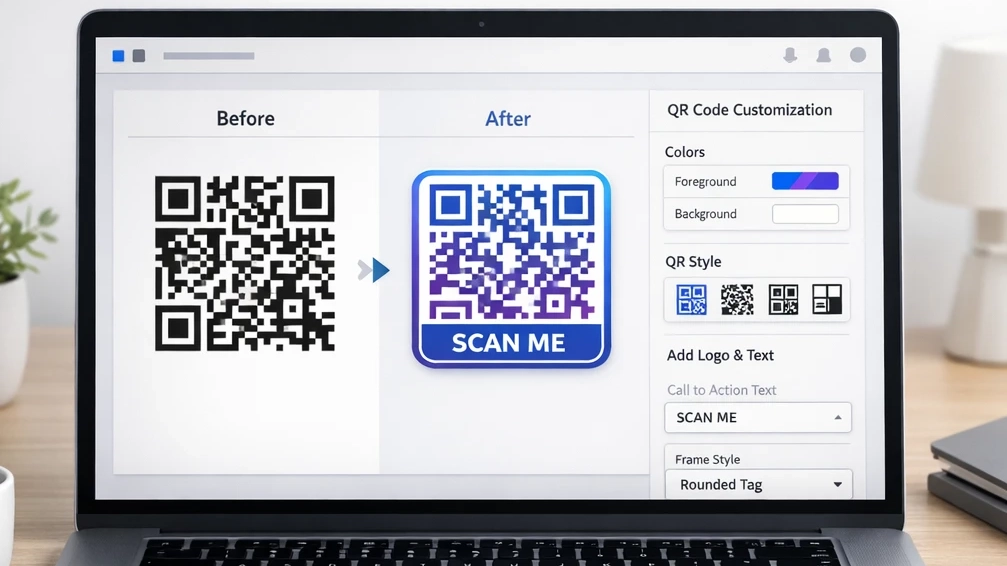
If you already have a QR code and want to make it look better without rebuilding everything from scratch, a tool like the Digibesti QR Code Customizer lets you control the visual aspects of the code. You can upload an existing QR image, change its color, add frames and text, adjust its size and position, upload a custom frame, preview the result, and download it again in PNG or SVG format. If you still need to create the code itself, Digibesti also offers a separate QR Code Generator, making the two-page workflow useful for people who want both creation and editing in one place.
So if you have been searching for how to customize QR code designs, how to design a custom QR code, or a free QR code editor that is simple enough for everyday use, this guide will walk you through the process in a practical way.
What is a QR code editor, and why use one?
A QR code editor is a tool that lets you adjust a QR code’s visual design after it has been generated. Instead of changing the destination, it changes how the code looks and fits into your design.
That matters because most real-world QR codes are not used in isolation. They sit on packaging, posters, menus, brochures, labels, signs, digital displays, and brand assets. Digibesti’s own QR ecosystem reflects that practical use: the generator supports websites, text, phone, email, SMS, vCard, location, Wi-Fi, and social options, while the customizer focuses on editing appearance and layout.
A strong custom QR code can help in three simple ways. First, it aligns better with your brand. Second, it gives better visual context when you add frames or text. Third, it can feel more trustworthy when people instantly understand what the scan is for. Nielsen Norman Group notes that QR codes need context because the code itself gives users very little clue about where it leads.
How to customize QR code designs step by step.
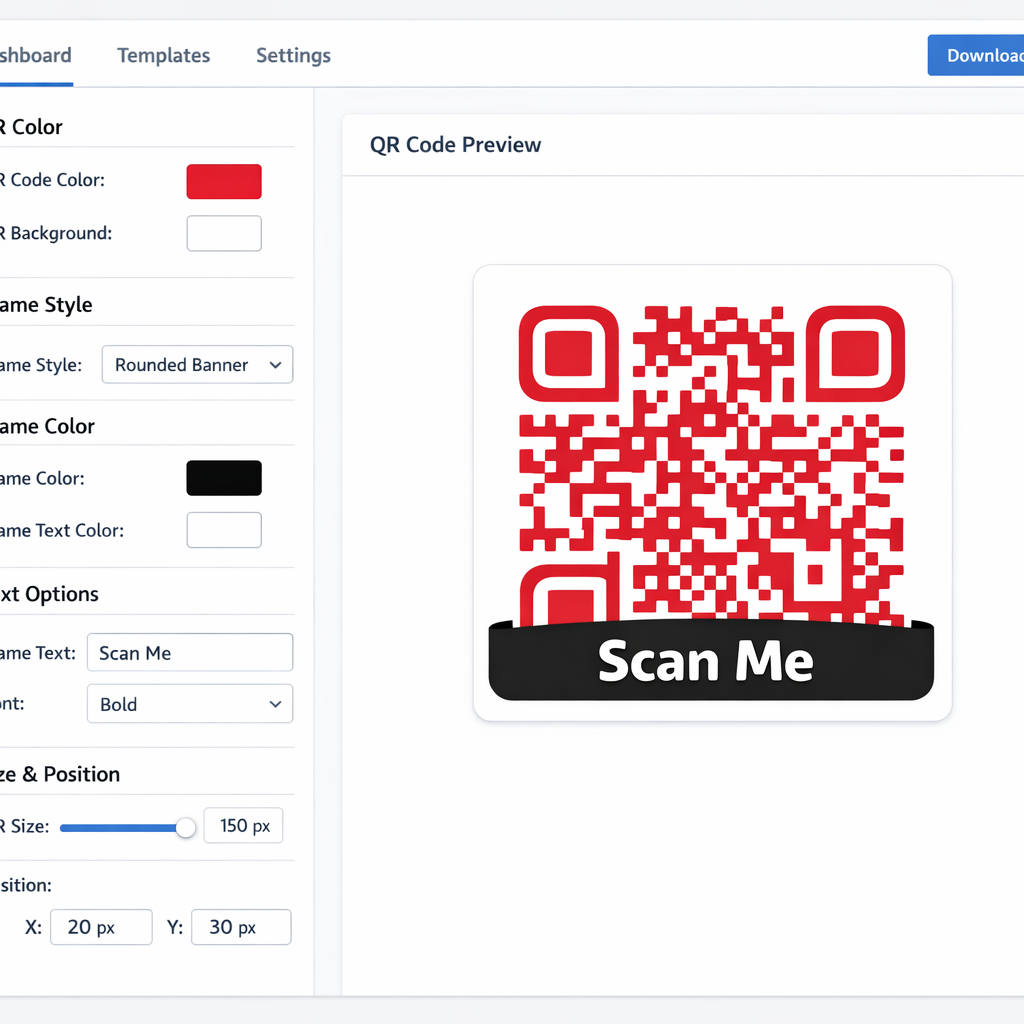 If you want the simplest way to customize QR code visuals, follow this workflow.
Start with an existing QR code.
The Digibesti customizer works with uploaded QR codes. Start by using your existing QR code or create one in the Digibesti QR Code Generator, then upload it into the customizer. The customizer accepts PNG and SVG formats. The generator also supports logo uploads and error-correction settings for more advanced branded results.
Change the QR code color.
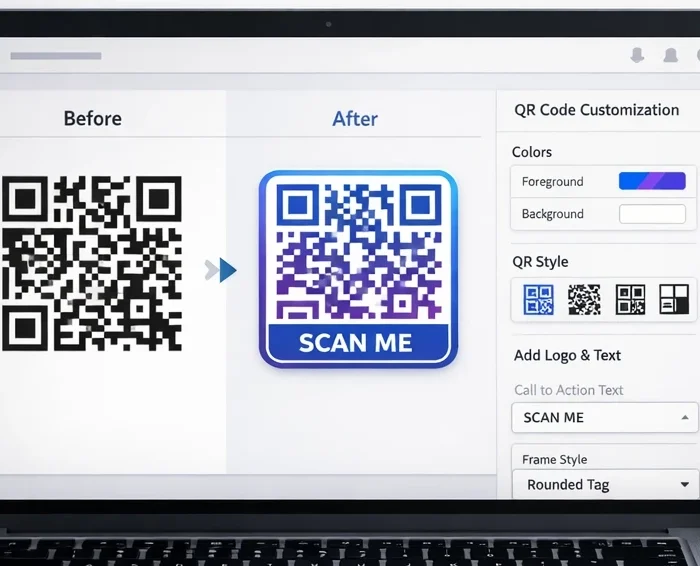
The easiest way to turn a generic QR code into a branded one is by changing the color. When your packaging, menu, or flyer uses a specific brand palette, matching the QR code to it can unify the design.
But use color carefully. QR guidance consistently favors a dark foreground (the parts of the QR code that form the pattern) on a light background because contrast improves scan reliability. Official QRcode.com troubleshooting guidance also warns that overlapping images or design elements can reduce contrast and make codes hard or impossible to read. Nielsen Norman Group similarly recommends a dark foreground with a light background rather than inverted color schemes.
A good rule is simple: keep the code dark enough to stand apart from the background, even when you customize it.
Add a frame and frame color.
Frames do more than decorate a code. They can tell the user what to do.
That matters because users scan more confidently when the purpose is obvious. NN/g recommends giving QR codes a clear context rather than leaving them unlabeled. A frame with text like “Scan to view menu,” “Scan to order,” or “Scan for offer” makes the code easier to understand at a glance.
Digibesti’s customizer includes frame styles, frame color, and position controls, so you can turn a plain code into something that looks intentional instead of accidental.
Add top and bottom text.
This is one of the most underrated features in a QR code editor.
A little text can make a huge difference because the user no longer has to guess. You can add a short call to action, a campaign label, a product name, or a direction, such as “Scan for Wi-Fi” or “Scan to see ingredients.” Digibesti lets you add top text, bottom text, font family, size, weight, color, and text position adjustments.
This is especially useful for custom QR code stickers, where you often have very little space and need the code to explain itself quickly.
Resize and reposition the QR code.
A good design is not only about how the QR code looks. It is also about how it sits inside the layout.
Digibesti gives you controls for the QR’s width and height, plus horizontal and vertical positioning. It also gives you similar controls for the frame. That makes it easier to create balanced designs for labels, posters, inserts, menu cards, and product packaging.
However, resize with care. QRcode.com warns that enlarging or shrinking a QR code with generic image-processing tools can distort the modules (the small squares that make up the QR pattern) and make scanning difficult or impossible. It also notes that you need to preserve a four-module margin (known as the ‘quiet zone’) around the code.
So if you are editing the size, always preview and test the finished code before printing or publishing.
Upload a custom frame.
This is where a basic design becomes a branded design.
If your brand has a shape system, seasonal campaign style, sticker layout, product label border, or promotional badge design, a custom frame helps you match the QR code to that creative direction. Digibesti supports uploading custom frames in SVG or PNG format, which is useful for more advanced branding work.
For packaging, promos, and social giveaway inserts, this can make a custom QR code feel like part of the design system instead of a pasted utility item.
Download and test
The last step is the one most people rush.
Digibesti lets you download the final result in PNG or SVG. SVG is especially useful for cleaner scaling in print workflows, while PNG is convenient for quick digital use. After downloading, test the code on multiple phones in normal lighting and at the size it will actually be used. Digibesti’s generator page already highlights PNG output and logo support, while the customizer adds PNG and SVG export options.
Testing matters because a QR code that looks beautiful but scans poorly is a design problem, not a win.
How to design a custom QR code that still scans
If you are serious about designing a custom QR code, remember this: good-looking QR codes still need to comply with scanning rules.
- Keep a strong contrast.
Use a darker code on a lighter background. Avoid low-contrast combinations and avoid design layers that make the code blend into the background. QRcode.com and NN/g both emphasize that contrast affects readability.
- Protect the quiet zone.
A QR code needs breathing room around it. QRcode.com specifically warns that letters or pictures placed around the code can remove the required margin (called the ‘quiet zone’), making the code hard or impossible to read. Their guidance also calls for a four-module (four small square units) margin around the QR code area.
- Do not distort the code.
Stretching or compressing a code carelessly can break it. QRcode.com says module distortion (distorting the individual small squares in the code) caused by image processing can make a code difficult or impossible to read.
- Use the right error correction when adding a logo.
If you want to learn how to make a custom QR code with a logo, error correction matters. QRcode.com explains that QR codes have four error-correction levels, and that raising the level improves error correction but also increases QR code size. Digibesti’s generator page clearly displays those options: Low 7%, Medium 15%, Quartile 25%, and High 30%.
That means the smarter workflow is this: generate the code with an appropriate error-correction level and logo first, then move it into the customizer to improve its visual presentation.
How to make a custom QR code with a logo

A lot of users search for custom QR code generator tools when what they really want is two things together: creation and refinement.
To achieve both creation and refinement, follow this straightforward workflow on Digibesti:
- Enter the destination or content type.
- Upload your logo if needed.
- Choose a sensible error-correction level.
- Download the QR code.
- Once you’ve downloaded your QR code, proceed to the QR Code Customizer.
- Upload the code.
- Add color, frame, text, spacing, and final styling.
- Download and test again.
This is why Digibesti can naturally be positioned as a QR code generator editor workflow rather than only a single-purpose tool: one page handles creation, while the other handles refinement.
Best use cases for custom QR code stickers
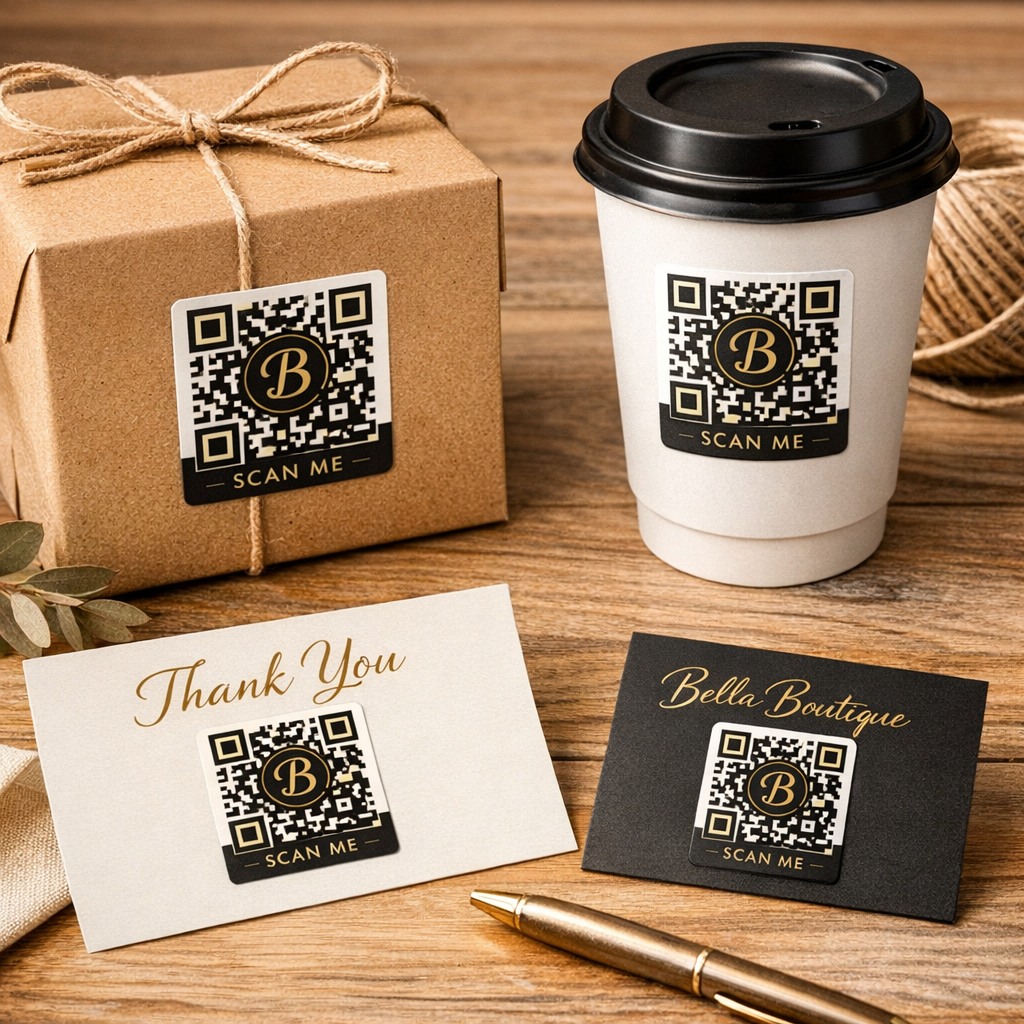
Custom QR code stickers work well when the code needs to live in the real world and still look branded.
Some practical examples are:
- product packaging
- takeaway bags
- café tables
- event badges
- thank-you cards
- laptop stickers
- in-store shelf talkers
- business cards
- direct-mail pieces
Connecting practical examples to broader use cases, Digibesti’s own QR content already highlights business cards, restaurant menus, Wi-Fi sharing, marketing campaigns, and event tickets as common uses for QR codes. NN/g also notes that QR codes are useful on physical products and printed materials when they provide direct mobile access to relevant information.
Transitioning to best practices, keep three things in mind for stickers: ensure the destination is mobile-friendly, label the scan action, and avoid small codes. NN/g notes that while the official minimum is smaller, aim for at least 2 cm by 2 cm for reliable scanning in real-world conditions.
Why Digibesti works as a free QR code editor
If someone is searching for a free QR code editor, QR code editor free, or QR code editor, the Digibesti tool already lines up well with that intent because it focuses on practical design controls rather than clutter.
The page supports the edits users need most: color, frame style, frame color, text, frame upload, resizing, repositioning, preview, and download. It’s ideal for marketers, business owners, designers, students, restaurant owners, e-commerce sellers, and anyone who wants better-looking code without complex software.
And because Google’s guidance favors helpful, reliable, people-first content, the strongest way to support this page is to avoid overpromising. It is to clearly explain what the tool does, who it is for, and how to use it well.
FAQs
Is Digibesti a free QR code editor?
Yes. The current QR Code Customizer page is presented as a free web-based tool and includes upload, customization, preview, and download controls directly in the browser.
Can I edit an existing QR code instead of generating a new one?
Yes. The Digibesti customizer lets you upload an existing QR code in PNG or SVG format and edit its appearance.
How do I make a custom QR code with a logo?
Use the Digibesti QR Code Generator first, because that page supports logo upload and error-correction settings. Then move the result into the customizer for frames, text, color, and layout adjustments.
What is the difference between a QR code generator and a QR code editor?
A generator creates the QR code data pattern. An editor customizes how the finished code looks. Digibesti offers both as separate but complementary pages.
What if someone searches for dqrcode?
Include the term once in the article or FAQ if it matters to your keyword targeting, but do not force it unnaturally throughout the page. In this context, it works best as a minor search variant rather than the main phrase.
Do custom QR code stickers really need testing?
Yes. Test every final design before printing. Contrast, size, margins, and distortion all affect whether a code scans reliably.
×